A Controlled Approach to Pitch
At its core, Antares Auto-Tune Pro is built around a simple but often misunderstood idea: pitch correction is not about perfection—it’s about alignment. Alignment with the key, with the arrangement, and ultimately with the emotional intent behind a vocal performance.
What makes Auto-Tune Pro particularly effective is the degree of control it offers over how that alignment is achieved. Instead of applying a one-size-fits-all correction, it allows you to define the behavior of the tuning process itself.
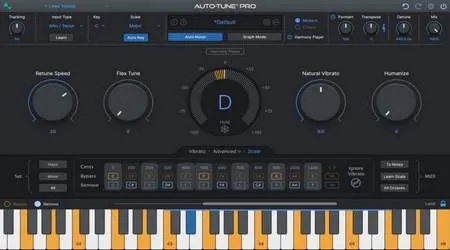
The Retune Speed parameter is the most immediate example. On the surface, it controls how quickly a note is pulled toward the target pitch. In practice, it defines the character of the vocal:
- A slower retune speed allows pitch deviations to exist briefly before correction. This preserves micro-variations—those subtle movements that make a vocal feel human and expressive. It’s especially useful for genres where nuance matters, such as acoustic, R&B, or cinematic vocals.
- A faster retune speed, on the other hand, minimizes that transition time. Notes lock into pitch almost instantly, creating a tighter, more controlled sound. This is where the recognizable “Auto-Tune effect” begins to emerge—not as a gimmick, but as a stylistic choice often used in modern pop and hip-hop production.
However, relying on retune speed alone would be limiting. This is where Humanize becomes essential. Humanize selectively relaxes the correction on sustained notes, allowing longer phrases to retain a natural stability without sounding overly processed. It prevents the vocal from feeling static, especially in passages where emotional delivery depends on slight pitch movement over time.
Then there’s Flex-Tune, which introduces a more conditional form of correction. Instead of pulling every note directly to pitch, Flex-Tune allows small deviations to pass through untouched, only intervening when the pitch drifts beyond a defined threshold. This creates a more performance-aware system—one that reacts to the singer rather than overriding them.
Together, these parameters form a cohesive framework:
- Retune Speed defines response time
- Humanize preserves sustained realism
- Flex-Tune respects intentional variation
What’s important is not just having these controls, but how they interact. A slower retune combined with moderate Flex-Tune, for example, can maintain a very natural vocal while still ensuring overall pitch accuracy. Conversely, a fast retune with minimal Humanize results in a highly controlled, stylized output.
This interplay turns pitch correction into a series of creative decisions rather than technical fixes. You’re not simply asking, “Is this in tune?”—you’re deciding how in tune it should feel.
And that distinction matters. Because in most musical contexts, the goal is not absolute precision, but believable expression. Auto-Tune Pro doesn’t force that decision—it gives you the space to define it.
Graph Mode: Where Precision Meets Interpretation
For situations that demand more than broad correction, Graph Mode introduces a distinctly different way of working with vocals. It moves the process away from automated assistance and into a more deliberate, editorial space—one where every adjustment is considered, not assumed.
At this stage, pitch correction becomes less about fixing and more about interpreting a performance.
Understanding the Role of Manual Control
Graph Mode allows you to visualize pitch as a continuous curve rather than a series of discrete notes. This shift in perspective is important. Instead of reacting to what the algorithm detects, you begin to work with what the performance intends to express.
With tools for line drawing, curve shaping, and note segmentation, you can:
- Adjust pitch trajectories without flattening natural movement
- Smooth out transitions between notes while preserving phrasing
- Refine sustained notes that drift slightly off-center
- Control vibrato depth and consistency without removing its character
This level of control is particularly useful when a vocal is already strong, but requires refinement to sit properly within the mix.
Editing with Intent, Not Correction
One of the common pitfalls in pitch editing is overcorrection—removing the very nuances that make a performance feel human. Graph Mode, when used thoughtfully, avoids this by encouraging selective intervention.
Rather than applying uniform correction, you can focus only on areas that disrupt the listening experience. For example:
- A note that resolves slightly flat at the end of a phrase
- A transition that feels abrupt due to inconsistent pitch movement
- A harmony layer that drifts just enough to create phase tension
In each case, the goal is not perfection, but cohesion. The adjustments are small, but their impact on the overall clarity of the vocal can be significant.
Preserving Emotional Nuance
Vocal performances often carry micro-variations—subtle pitch movements that convey emotion. These details are easy to lose with aggressive automatic settings.
Graph Mode makes it possible to preserve those nuances by working around them, not against them.
You can maintain:
- Natural vibrato patterns
- Slight pitch dips that add expressiveness
- Dynamic phrasing that follows the lyrical delivery
This approach ensures that the vocal remains expressive, even after technical refinement.
Aligning Vocals in Complex Arrangements
In layered productions, consistency becomes more critical. Multiple vocal tracks—lead, doubles, harmonies, ad-libs—need to align not only rhythmically, but also harmonically.
Graph Mode provides the precision required to:
- Match pitch centers across stacked vocals
- Ensure harmonies lock together without sounding mechanical
- Reduce subtle clashes that accumulate in dense arrangements
The result is a tighter, more cohesive vocal section, without sacrificing individuality between layers.
A Slower Process, A Clearer Outcome
Working in Graph Mode is inherently more time-consuming than real-time correction. But the trade-off is clarity and control.
Each decision is intentional:
- What to correct
- What to leave untouched
- How much adjustment is enough
This slower pace often leads to more confident results, because the outcome is shaped step by step rather than processed all at once.
Closing Perspective
Graph Mode within Antares Auto-Tune Pro reflects a broader principle in music production: precision should serve expression, not replace it.
By offering detailed control without forcing uniformity, it allows producers to refine vocals in a way that respects the original performance. The goal is not to create something artificial, but to reveal what was already there—more clearly, and more intentionally.
Workflow Integration
A Seamless Presence Inside the DAW
Antares Auto-Tune Pro integrates into most modern DAWs with very little resistance, both technically and creatively. Whether it’s inserted during tracking or applied later in post-production, the plugin maintains a consistent behavior that doesn’t interrupt the broader session flow.
From a structural standpoint, this matters. In a well-organized production environment, tools should adapt to the workflow—not the other way around. Auto-Tune Pro achieves this by offering predictable performance across different stages of production, allowing producers to move between recording, editing, and refinement without needing to rethink their setup.
Real-Time Feedback During Recording
Low-latency processing is not just a convenience—it directly affects performance quality. When artists hear their voice processed in real time, they naturally adjust phrasing, pitch, and dynamics with more confidence.
This creates a feedback loop:
- The artist performs closer to the intended result
- The producer spends less time correcting later
- The recording itself becomes more intentional
Instead of treating pitch correction as a post-production safety net, Auto-Tune Pro allows it to become part of the performance itself.
Reducing Friction in the Creative Process
Traditionally, vocal production is divided into two distinct phases:
- Capturing the performance
- Correcting and refining it afterward
Auto-Tune Pro softens that boundary. By enabling real-time correction alongside detailed post-editing tools, it allows both stages to coexist.
This continuity reduces creative friction. Ideas don’t get lost between stages, and decisions made during recording can carry forward more naturally into mixing. The result is a workflow that feels less fragmented and more cohesive.
Classic vs. Modern Processing
Understanding the Role of Algorithm Character
Auto-Tune Pro includes both Modern and Classic processing modes, and the distinction between them is more than technical—it’s contextual.
The Modern algorithm is designed for transparency. It applies pitch correction with minimal artifacts, making it suitable for contemporary genres where clarity and precision are prioritized.
Classic Mode, on the other hand, recreates the behavior of earlier Auto-Tune versions. It introduces a slightly more pronounced character—subtle shifts in how pitch transitions are handled, and a texture that feels less clinical.
Choosing Based on Musical Context
Rather than thinking in terms of “better” or “worse,” the decision between these modes is better framed as a creative choice:
Modern Mode
- Cleaner pitch transitions
- More transparent correction
- Suitable for pop, R&B, and polished commercial productions
Classic Mode
- Slightly more noticeable pitch movement
- Adds a familiar tonal character
- Works well in genres that benefit from texture or stylistic imperfection
What’s important is how this choice aligns with the overall production identity. The algorithm becomes part of the sound design, not just a corrective process.
Subtle Influence on Perception
Even when applied with similar settings, the two modes can influence how a vocal is perceived in a mix. Modern mode tends to blend seamlessly, while Classic mode can introduce a faint sense of presence or edge.
These differences are small, but in a detailed mix, small differences accumulate. Over time, they shape the listener’s experience in ways that are often felt rather than consciously noticed.
Subtlety as a Strength
Moving Beyond the Obvious Effect
Auto-Tune is often associated with its most recognizable use—the fast retune, heavily processed vocal effect. While that remains a valid stylistic choice, it represents only a narrow portion of what the tool can do.
In practice, Auto-Tune Pro is most effective when used with restraint.
Invisible Correction, Audible Impact
When applied carefully, pitch correction becomes nearly imperceptible:
- Vocals sit more confidently within the harmonic structure
- Small pitch inconsistencies are resolved without flattening expression
- Transitions between notes feel more controlled, yet still natural
This kind of subtle correction doesn’t call attention to itself, but it improves the overall coherence of a track.
Supporting Harmony and Layering
In productions with stacked vocals—harmonies, doubles, or background layers—precision becomes increasingly important. Even minor pitch variations can create phase issues or tonal imbalance.
Auto-Tune Pro helps maintain alignment across these layers:
- Harmonies lock more tightly together
- Chord structures feel more stable
- The mix gains clarity without additional processing
Here, the tool acts less like an effect and more like a structural support system for the arrangement.
Preserving Performance While Refining It
The key challenge in pitch correction is preserving the human quality of a performance while improving its accuracy. Overcorrection can remove the subtle imperfections that make a vocal feel alive.
Auto-Tune Pro addresses this through parameters like Humanize and Flex-Tune, which allow partial correction rather than absolute enforcement. This creates space for natural variation while still guiding the vocal toward its intended pitch.
A Philosophy of Restraint
At its best, Auto-Tune Pro reflects a broader production philosophy:
tools should serve the idea, not dominate it.
When used with intention:
- It enhances clarity without imposing character
- It refines performance without rewriting it
- It supports the mix without becoming the focus
And in a disciplined workflow, that subtlety is not a limitation—it’s a strength.
Final Thoughts
Beyond Correction: Defining Vocal Intent
Antares Auto-Tune Pro is often introduced as a pitch correction tool, but in practice, its role extends further. It becomes part of how a vocal is presented, not just how it is fixed. The distinction may seem subtle, yet it fundamentally changes how the tool fits into a production workflow.
Rather than reacting to imperfections, Auto-Tune Pro encourages a more deliberate approach—one where pitch, timing, and tonal consistency are aligned with the intended emotional outcome of the track. In this context, correction is no longer a technical necessity, but a creative decision.
Intentional Use Over Passive Fixing
The effectiveness of Auto-Tune Pro depends largely on how it is approached. When used passively, it can quickly flatten expression and reduce a performance to something overly mechanical. But when applied with intention, it allows producers to guide a vocal without removing its identity.
This is where its parameters become meaningful:
- Retune Speed defines how tightly the vocal adheres to pitch
- Humanize preserves natural variation in sustained notes
- Flex-Tune allows subtle deviations to remain intact
Each adjustment reflects a choice. Not about correctness—but about character.
Supporting the Creative Workflow
From a workflow perspective, Auto-Tune Pro integrates in a way that minimizes disruption. Whether used during tracking or in post-production, it supports continuity across stages of the creative process.
- During recording, low-latency performance helps artists stay connected to the intended sound
- In editing, Graph Mode enables precise refinement without overprocessing
- In mixing, subtle adjustments help vocals sit more cohesively within the arrangement
This continuity matters. It reduces the need to “fix later,” and instead encourages decisions to be made earlier—when they are still connected to the creative intent.
Balancing Precision and Expression
One of the more nuanced aspects of Auto-Tune Pro is its ability to balance technical precision with musical expression. Perfect pitch is not always the goal. In many cases, slight imperfections contribute to authenticity.
Auto-Tune Pro allows that balance to be maintained:
- Tight enough to feel polished
- Loose enough to remain human
This is particularly important in genres where emotional delivery carries more weight than technical accuracy.
A Tool That Respects Performance
At its best, Auto-Tune Pro does not draw attention to itself. It operates quietly in the background, shaping the vocal just enough to support the overall mix.
It does not replace performance. It refines it.
And that distinction is critical. Because once a tool begins to override the original intent, it stops being part of the creative process and starts becoming a constraint.
Closing Perspective
For producers who prioritize clarity, control, and a structured approach to production, Antares Auto-Tune Pro offers a reliable and flexible solution. It adapts to different workflows without imposing a rigid methodology.
Ultimately, its value lies not in how aggressively it can correct—but in how subtly it can guide.
In a production environment where every detail contributes to the final result, that level of control is not just useful—it is essential.